> ## Documentation Index
> Fetch the complete documentation index at: https://docs.firebolt.io/llms.txt
> Use this file to discover all available pages before exploring further.
> Use this reference to learn about the metadata available about privileges using the information schema.
# Object privileges
The `information_schema.object_privileges` view provides information about permissions granted to each role.
To be able to access this information, you must have [role privileges](/security/rbac/role-permissions#role-permissions), ownership of the role, ownership of the object to which the role is granted, or be the member of the role.
All object privileges are explicitly listed in `information_schema.object_privileges`. If the `ANY` privilege is granted on an object, it also shows the corresponding privilege on the object's descendants.
For example, if you grant `USAGE ANY ENGINE` privilege on the account, you will be able to see `USAGE` privilege for all of the engines in the account.
The following code example creates two engines, a role, and grants that role permission to use any engine in the specified account:
```sql theme={"theme":{"light":"css-variables","dark":"css-variables"}}
CREATE ENGINE engine1;
CREATE ENGINE engine2;
CREATE ROLE developer_role;
GRANT USAGE ANY ENGINE ON ACCOUNT account_name TO developer_role;
```
Then, the following code example retrieves all privileges granted to the `developer_role` on Firebolt objects, showing the grantor, grantee, object name, object type, and privilege type:
```sql theme={"theme":{"light":"css-variables","dark":"css-variables"}}
SELECT
grantor, grantee, object_name, object_type, privilege_type
FROM
information_schema.object_privileges
WHERE
grantee = 'developer_role';
```
| grantor | grantee | object\_name | object\_type | privilege\_type |
| ----------- | ---------- | ------------- | ------------ | ------------------ |
| admin\_user | role\_name | account\_name | account | `USAGE ANY ENGINE` |
| admin\_user | role\_name | engine1 | engine | `USAGE` |
| admin\_user | role\_name | engine2 | engine | `USAGE` |
### View account, role, user, engine, and database permissions
To view account, role, user, engine and database permissions, make sure that current database is **not** selected. Then, query the `information_schema.object_privileges` view as shown in the following examples:
**View privileges directly under an account**
To view all privileges directly under an account, ensure that no database is selected, and query the `information_schema` as follows:
```sql theme={"theme":{"light":"css-variables","dark":"css-variables"}}
SELECT
*
FROM
information_schema.object_privileges;
```
You can also deselect the current database in the **Firebolt Develop Space** user interface (UI), by choosing `None` in 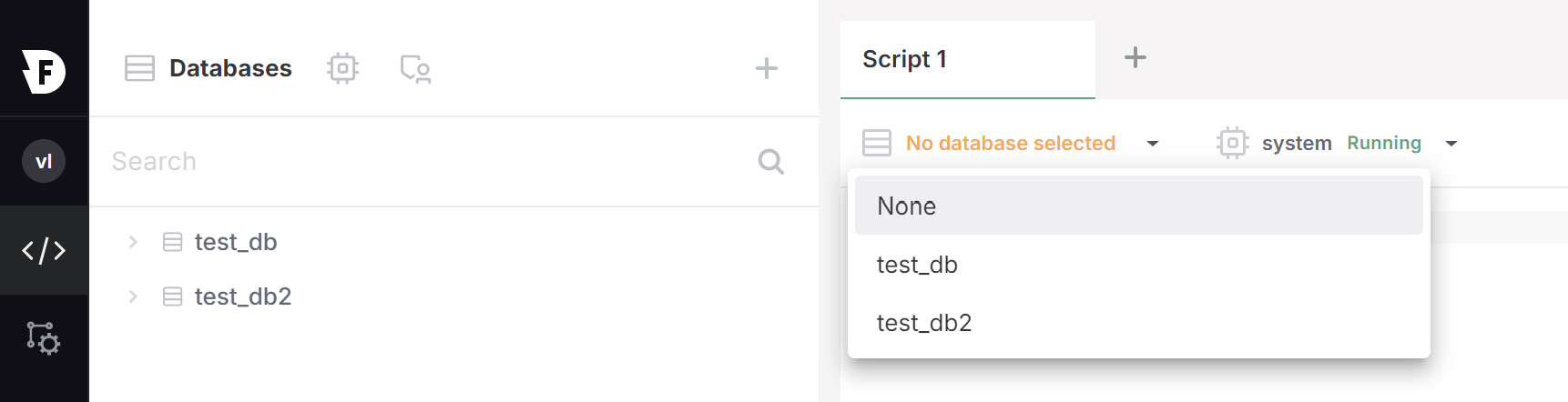 .
**View privileges in a specific database**
To view all privileges under a user defined database `db`, specify the database in the query as follows:
```sql theme={"theme":{"light":"css-variables","dark":"css-variables"}}
SELECT
*
FROM
db.information_schema.object_privileges;
```
### View object permissions in the current database
When the current database is selected,`information_schema.object_privileges` only shows permissions for objects within that database. It does not show permissions for accounts, roles, users, engines, databases, and objects in other databases.
To view permissions for schemas, tables and views in the current database, set the current database with [USE DATABASE](/reference-sql/commands/data-definition/use-database), then select and view privileges in a query as follows:
```sql theme={"theme":{"light":"css-variables","dark":"css-variables"}}
USE DATABASE db;
SELECT
*
FROM
information_schema.object_privileges;
```
You can also use the
.
**View privileges in a specific database**
To view all privileges under a user defined database `db`, specify the database in the query as follows:
```sql theme={"theme":{"light":"css-variables","dark":"css-variables"}}
SELECT
*
FROM
db.information_schema.object_privileges;
```
### View object permissions in the current database
When the current database is selected,`information_schema.object_privileges` only shows permissions for objects within that database. It does not show permissions for accounts, roles, users, engines, databases, and objects in other databases.
To view permissions for schemas, tables and views in the current database, set the current database with [USE DATABASE](/reference-sql/commands/data-definition/use-database), then select and view privileges in a query as follows:
```sql theme={"theme":{"light":"css-variables","dark":"css-variables"}}
USE DATABASE db;
SELECT
*
FROM
information_schema.object_privileges;
```
You can also use the 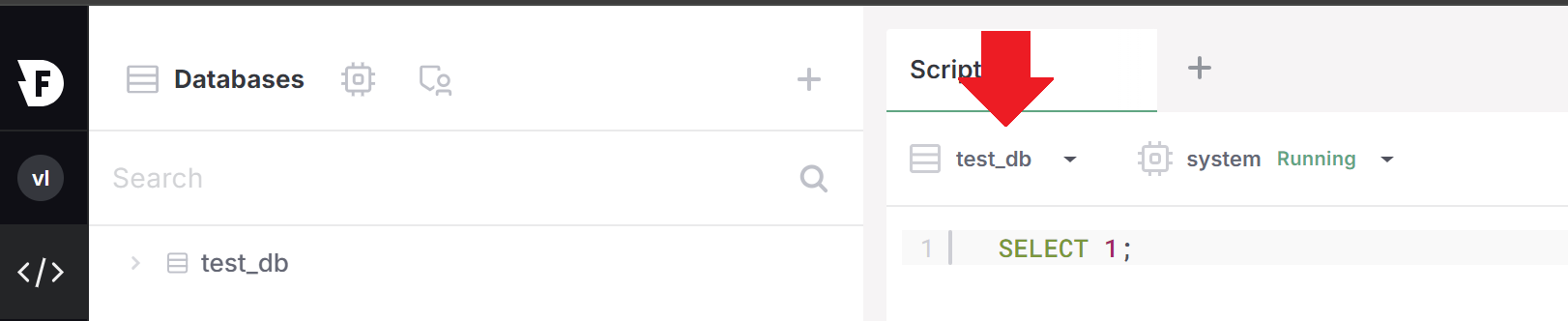 in the UI.
### View object permissions in the organization
To view all privileges directly under your **organization**, query the `information_schema` as follows:
```sql theme={"theme":{"light":"css-variables","dark":"css-variables"}}
SELECT
*
FROM
org_db.information_schema.object_privileges;
```
## Columns in `information_schema.object_privileges`
Each row in `information_schema.object_privileges` contains the following columns:
| Column Name | Data Type | Description |
| :-------------- | :---------- | :-------------------------------------------------------------------- |
| grantor | TEXT | The name of the user that granted the privilege. |
| grantee | TEXT | The name of the role that the privilege was granted to. |
| object\_catalog | TEXT | The database containing the object on which the privilege is granted. |
| object\_schema | TEXT | The schema containing the object on which the privilege is granted. |
| object\_name | TEXT | The name of the object on which the privilege is granted. |
| object\_type | TEXT | The type of the object on which the privilege is granted. |
| privilege\_type | TEXT | The type of the privilege granted on the object. |
| is\_grantable | TEXT | Specify `YES` if the privilege is grantable, and `NO` otherwise. |
| created | TIMESTAMPTZ | The creation time of the privilege. |
in the UI.
### View object permissions in the organization
To view all privileges directly under your **organization**, query the `information_schema` as follows:
```sql theme={"theme":{"light":"css-variables","dark":"css-variables"}}
SELECT
*
FROM
org_db.information_schema.object_privileges;
```
## Columns in `information_schema.object_privileges`
Each row in `information_schema.object_privileges` contains the following columns:
| Column Name | Data Type | Description |
| :-------------- | :---------- | :-------------------------------------------------------------------- |
| grantor | TEXT | The name of the user that granted the privilege. |
| grantee | TEXT | The name of the role that the privilege was granted to. |
| object\_catalog | TEXT | The database containing the object on which the privilege is granted. |
| object\_schema | TEXT | The schema containing the object on which the privilege is granted. |
| object\_name | TEXT | The name of the object on which the privilege is granted. |
| object\_type | TEXT | The type of the object on which the privilege is granted. |
| privilege\_type | TEXT | The type of the privilege granted on the object. |
| is\_grantable | TEXT | Specify `YES` if the privilege is grantable, and `NO` otherwise. |
| created | TIMESTAMPTZ | The creation time of the privilege. |